nerding out
Somehow I found a way to make a dual-streaming setup even more complicated.
Rather than upgrading to a much more powerful (and expensive) PC, we started with a dual-streaming setup using mostly things we already had.
When I got a good deal on parts for a partial upgrade of my editing PC, I used some of the old parts and a second had GPU to build Seza’s current Gaming PC.
Seza’s setup includes:
A gaming PC - my old editing PC with a second hand GPU.
A streaming PC that handles encoding for the stream and a separate, higher quality recording.
2 capture cards - 1 for the PC, another for Nelly’s camera.
An Unraid server made out of parts from her old streaming PC for recording and storage.
A Windows 11 virtual machine to run a video editing database and a custom clip extraction script.
A backup server (also running Unraid) made from a second hand PC and some used datacentre hard drives.
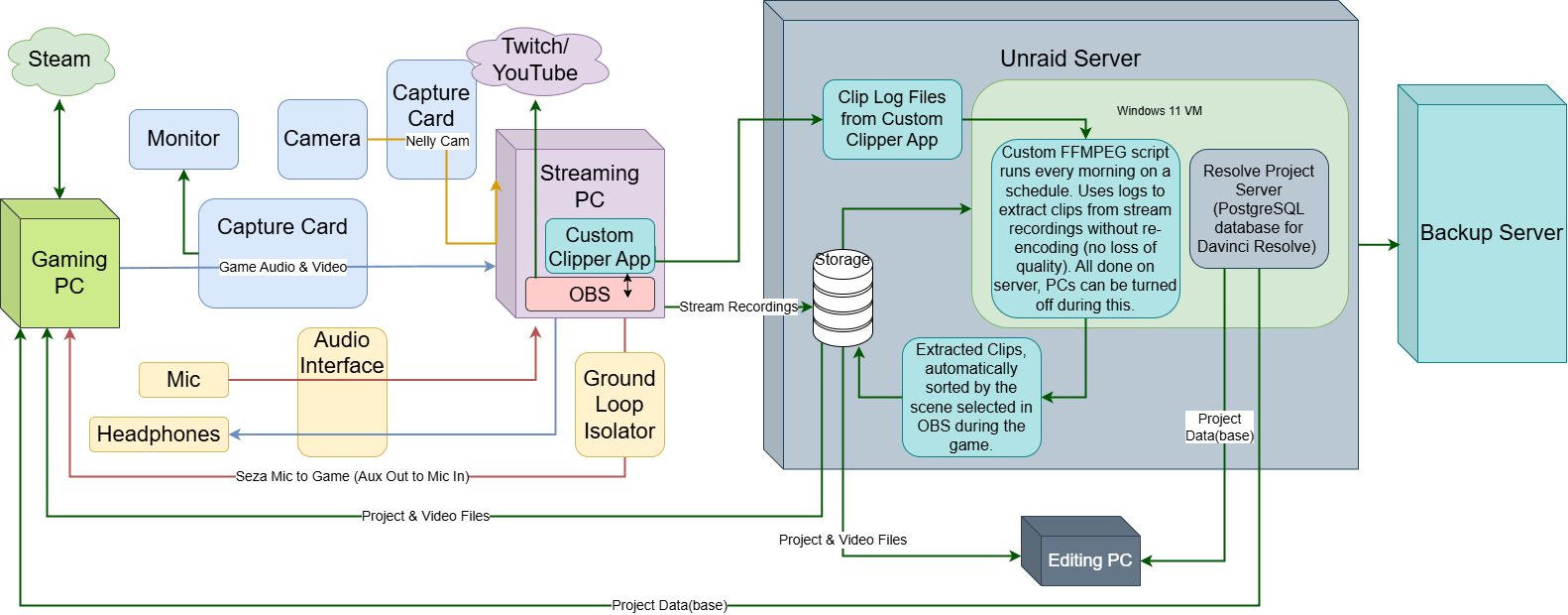
This is a simplified version of the current setup:
Audio
An Elgato HD60x captures video and audio from the Gaming PC and sends it to the Streaming PC. Getting the audio output to work is a little fiddly, and we ended up needing to install the Elgato app on the Streaming PC to change the settings for the HD60x on that, even though that app is closed during streaming and recording.
It doesn’t always default to being the main audio output on startup, so I have had to teach Seza how to switch between options, and have disabled as many other outputs as I can to make this easier.
Seza’s mic is captured on the Streaming PC with a Focusrite Vocaster 2. She hears the game through headphones connected to this.
This model allows a second set of headphones to be connected with a separate physical volume knob. This is handy when I want to have a quick chat with the stream when I get home or if Seza wants to show me something.
OBS is set to capture sound from the game and the mic on separate channels in the recording so we can adjust the volume during editing. These are combined on a separate channel that OBS sends to the stream.
For people to hear Seza in-game, we need to get the mic audio from the Streaming PC to the Gaming PC.
To do this, we use an Aux cable from the analogue line-out on the motherboard of the Streaming PC to the Analogue line-in on the motherboard of the Gaming PC. This is really annoying to set up in Windows 11 because most of the settings are well hidden and I never remember where to look on the first attempt.
We have a ground loop isolator connected to the Streaming PC, with the auxiliary cable running from that to the Gaming PC. This reduces 50hz/60hz hum and noise in the cable so that it doesn’t sound terrible to people she is playing with.
There are mixers on the market now that allow you to connect to both PCs with a USB cable. This is the next upgrade we want to do because it will be way easier to set up, give more control, and should sound better than the current audio interface does.
Video
As noted above, game capture is via an Elgato HD60x. A 3-way HDMI switcher is connected between the Gaming PC and the capture card so that other devices like consoles or a laptop can be connected without having to disconnect the cabling to the PC. This was handy when the Gaming PC started having issues recently as it made it much faster to connect the laptop and get Seza up and running again.
Nelly’s camera setup is a little overkill. I already had the camera and lighting gear though. The only extra thing we had to get was the blue screen, after I tried out my green screen, forgetting she is mostly green.
It looked funny having her head floating around, but seeing all of her makes more sense for the stream.
To make the background clear behind Nelly, we use the ChromaKey filter on the camera input in OBS, and set it to a custom colour. The lighting makes a big difference, and we have to be careful not to accidentally change the colour temperature of the lights when we turn them on.
Equipment:
Elgato Cam Link 4K HDMI to USB capture card.
Blackmagic Pocket Cinema 4K digital cinema camera.
Tokina ATX Pro SV 28-70mm f2.8 lens.
I found this in a Cash Converters (chain of pawnbrokers) years ago.
Not in great shape but it does the job.
Viltrox M4/3 to EF active focal reducer.
Adapts the lens to the camera body .
Increases the how much field of view (FOV) is lost by adapting to a smaller sensor.
Increases the amount of light that hits the sensor.
Makes the electronics in the lens talk to the camera.
Neewer Pop-Out Bluescreen - goes behind the cage.
2x Neewer LED video lights with colour temp adjustment.
Neewer Fluid head tripod.
Smallrig camera cage.
Right angle adapter plate - for portrait mounting the camera on the tripod.
All that so we can have her on screen and see the games through the back of the cage.
Plus, I get to play camera man following Nelly around.
Clips
Seza often makes clips while she is streaming using the features built into Twitch.
I have also built - with a lot of help from AI and lots of trial and error - an app that she can use to capture information from OBS while she is streaming to mark when something happens that she wants a clip of for later.
This creates a log entry of what scene she had selected, the video file being recorded, the start and end times, and if the video file changed from the start to the finish of the clip.
Every morning a script runs on a virtual machine on the recording server that generates commands for FFMPEG. This extracts the section of the video files covered by the clip times and remuxes these to MP4 files.
This has the following advantages:
Seza only has to mark when she wants the clip to start (1, 2, 5, or 10min in the past), and when she wants the clip to end.
The rest of the process is automated.
Clips are easy to find because they sorted into folders based on the scene selected in OBS.
Helldivers 2 clips all go into a Helldivers 2 folder, R.E.P.O. clips are in a different folder, and so on.
Because the clips are extracted, they do not need to be re-encoded. There is no loss of quality.
Everything runs on the server so the other PCs can be turned off.
Fast because there is no encoding happening, safe because the original files are retained.
Disadvantages:
Bespoke and I’m not a programmer = good luck figuring out what’s wrong if it stops working.
Seza might forget to stop a clip and leave it running for ages…
OBS might change something and break the way it gets the information. Can’t update the app without testing on another PC first.
Storage - prioritising quality comes with issues around storage. If we don’t review the clips and do something with them, we don’t know what we can get rid of and the server will fill up quickly.
Editing
The main reason for building the Unraid server was to run Resolve Media Server.
This allows a single copy of the video and project files to be saved on the server and accessed from any PC on our local network that has Davinci Resolve Studio installed. This software came with my camera.
While I am teaching Seza video editing, she can use a template to collect any clips she wants to use, put them in a timeline, and do the parts of the edit she is comfortable with. She can use titles to add in notes and ideas for what she wants added or changed and where.
Then she can save and close the project. When I open the app I can see the project in the database and open it on my PC. It accesses the same files and shows all of her edits without me having to move or copy anything.
This lets me pick up where she left off without having to keep track of where everything is. It is a massive time saver and is much closer to the way professional editing houses manage their workflow.
We also have a laptop to use temporarily in place of the Gaming or Streaming PC if either has an issue - the laptop can also be used to edit videos if guests are sleeping in the spare room where my PC is. This gives us some redundancy, and was really useful recently when we started to have issues with the Gaming PC, that I didn’t have time to troubleshoot immediately.
PCs
Gaming PC
CPU: AMD Ryzen 3700x (8c, 16t)
GPU: AMD RX 6700 XT (12GB)
RAM: 32GB DDR4
Streaming PC
CPU: Intel i5 12600K (10c, 16t)
GPU: Nvidia GTX1660 (6GB)
RAM: 32GB DDR5
Editing PC
CPU: AMD Ryzen 5900x (12c, 24t)
GPU: RTX5070 (12GB)
RAM: 128GB DDR4
Laptop (Backup PC)
CPU: Intel i7-13620H (10c, 16t)
GPU: Nvidia RTX 5060 (8GB)
RAM: 16GB DDR5
Unraid Server
CPU: Intel i5 9500T (6c, 6t)
iGPU: UHD630
RAM: 32GB DDR4
Backup Server
CPU: Intel i5 8500 (6c, 6t)
iGPU: UHD630
RAM: 16GB DDR4